
Web Phone for Developers
Web Phone is the open-source WebRTC/VoIP SDK behind Siperb — and it’s yours to use, for free. Take the core JavaScript, drop it into your website, CRM, or SaaS application, and give your users a fully functional softphone right in the browser. No plugins. No downloads. No Siperb branding unless you want it.
It’s the kind of tool that “just works” — but gives you the control to make it do exactly what you need. Whether you’re embedding a click-to-call button for customer support, building a full operator console into your CRM, or white-labelling a communications product, Web Phone is the foundation.
How It Works
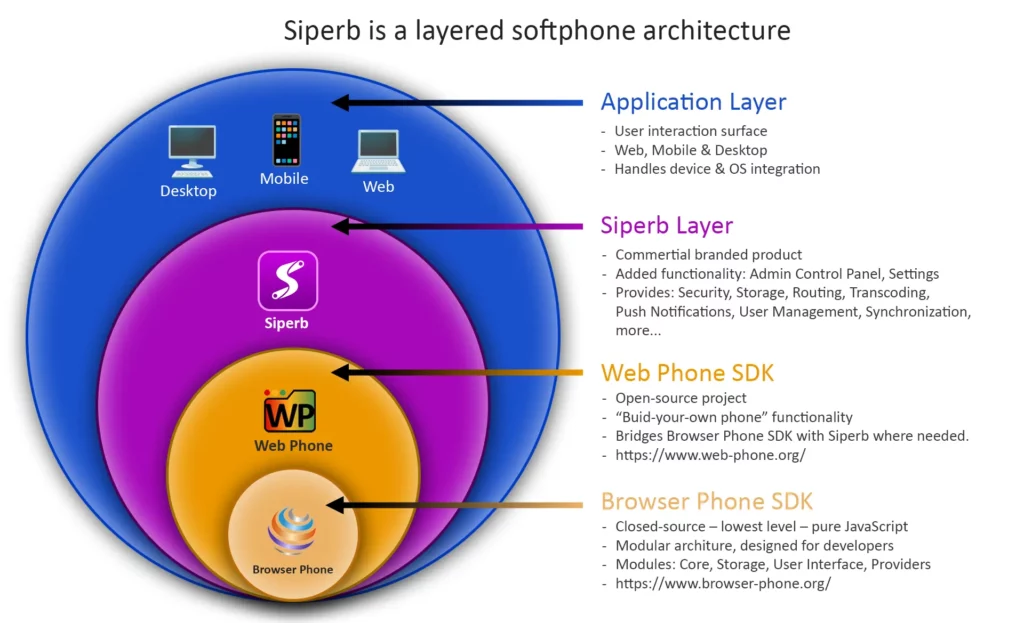
At its core, Web Phone is an SDK that handles the heavy lifting of SIP/WebRTC communication in the browser. You load a single JavaScript file, point it at your PBX (or let Siperb’s proxy handle the connection), and you’ve got a working phone. The SDK manages SIP signalling over WebSocket, WebRTC media negotiation, and the phone UI — all inside an iframe you control.
You choose how deep you want to go:
- Use the Browser Phone SDK as-is — load our pre-built phone UI into an iframe, provision it with SIP credentials, and you’re done in under 20 lines of code.
- Bring your own SIP stack — use the SDK purely for login and provisioning, then wire up your own phone client using SIP.js, JsSIP, or any JavaScript SIP library.
- Go fully manual — skip provisioning entirely, hard-code your PBX details, and use the Browser Phone UI as a self-hosted softphone. Zero Siperb involvement.
Three Ways to Integrate
Web Phone offers three integration paths, each with a different balance of simplicity, security, and features. Pick the one that fits your setup:
| Integration Path | Provisioning | Proxy | Best For |
|---|---|---|---|
| 1. Manual Setup | None (you provide SIP credentials) | No | Developers who want full control, no Siperb account needed. Completely free. |
| 2. Siperb Provisioning, Direct to PBX | Yes (login + fetch config) | No | Managed deployments where you want centralised config but direct PBX connectivity. |
| 3. Siperb Provisioning + Proxy | Yes | Yes | Full-featured setup with secure credentials, transcoding, SIP trace, and diagnostics. Recommended. |
What You Get
- Browser Phone SDK — a complete, embeddable phone UI with dial pad, call controls, transfer, hold, mute, recording, call history, and more. Loads in an iframe, fully styleable.
- Provisioning API — login with a Personal Access Token, fetch device configuration, and have SIP credentials delivered automatically. No hard-coded passwords in your source code.
- Click to Dial — programmatically initiate calls from anywhere in your application. One API call, one click, call placed.
- Multiple SDK support — works with our Browser Phone SDK, SIP.js, JsSIP, or your own SIP stack.
- Open source — inspect, fork, and contribute. Available on GitHub.
Requirements
Getting started is straightforward. You’ll need:
- A modern browser with WebRTC support (Chrome, Firefox, Edge, Safari).
- Your web app served over HTTPS — required for microphone access in most browsers.
- A SIP-compatible PBX (Asterisk, FreeSWITCH, OpenSIPS, or any SIP server) — or you can use Siperb’s proxy if your PBX doesn’t support WebRTC natively.
That’s it. Load the SDK, configure your connection, and you’ve got a phone.
The Path to Free
The Web Phone SDK and Browser Phone UI are completely free. You can self-host, connect directly to your own PBX via WebSocket, and run indefinitely without a Siperb account or any payment.
Where Siperb adds value — and where costs begin — is when you need infrastructure that your PBX can’t provide on its own:
- SIP Proxy — routes calls through Siperb’s servers, keeping your PBX credentials hidden from browser source code. Essential for multi-tenant and public-facing deployments.
- Media Transcoding — converts between WebRTC’s encrypted media (DTLS-SRTP/Opus) and traditional RTP, so legacy PBX systems work without reconfiguration.
- Provisioning — centralised device and credential management via the Admin Control Panel.
- Diagnostics — SIP trace logs, latency monitoring, and call quality analytics.
See our Pricing page for details on what’s included at each tier.
Web Only
This section covers browser-based deployment only — embedding Web Phone into web pages and web applications. If you’re looking for native Desktop (Electron) or Mobile (React Native) apps, those are part of the full Siperb Softphone product, which includes all platforms under one account.
Articles and Resources
- Using Siperb Provisioning and ProxyWith the 3rd option you will use all the options, and have the most secure solution. Your PBX credentials are securely stored,…
- Manual Setup (Direct to PBX)This is the simplest way to get Web Phone running — and it’s completely free. You load the Browser Phone SDK, provide…
- Configuration OptionsThe ProvisionPhone() method accepts a configuration object that controls how the phone UI behaves, what features are enabled, and how it integrates…
- SDK ReferenceThe Siperb Web Phone SDK exposes a set of core functions under the global window.Siperb namespace. This reference documents the primary methods…
- Web Phone — Click to DialClick to Dial — also known as Click to Call — is one of the most useful features you can add to…
- Using Siperb Provisioning (Direct to PBX)This integration path uses Siperb’s provisioning service to manage your SIP configuration centrally — but your phone still connects directly to your…
- Siperb API – Introduction
Siperb makes use of REST API calls in all its administration and management functions.