
Siperb Products & Resources
Siperb is a WebRTC-based VoIP platform built around a single core technology — a browser-native SIP phone that works without plugins, downloads, or specialist hardware. That core ships in three distinct forms depending on who you are and what you’re building.
This knowledge base is organised around those three products. Start with the one that matches your situation.
Web Phone — For Developers
You want to embed a working phone into your own product.
The Web Phone is an open-source JavaScript SDK. Drop it into your website, CRM, SaaS platform, or internal tool and your users get a fully functional SIP softphone running directly in the browser. No Siperb account required to get started. No branding you didn’t choose. Just a phone that works.
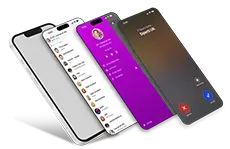
The SDK handles SIP signalling over WebSocket, WebRTC media negotiation, and the phone UI — delivered as a single JavaScript file you load from a CDN or self-host. You choose how deep you integrate:
- Manual setup — hard-code your PBX credentials, zero cloud dependency, completely free
- Siperb provisioning — manage SIP credentials centrally, deploy across users without touching code
- Siperb proxy — route calls through Siperb’s secure media proxy; no exposed passwords, transcoding support, SIP trace logs
The core SDK and Browser Phone UI are open source and free to use. The provisioning service and proxy are free on the Personal plan. Transcoding, extended logs, and multi-user deployments require a paid plan.
Start here: Web Phone for Developers →
Siperb Softphone — For End Users
You want a ready-made softphone that connects to your existing PBX.
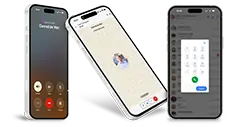
Siperb Softphone is the full end-user application — available as a web app, a desktop application for Windows, macOS, and Linux, and a mobile app for iOS and Android. All three share the same account, call history, contacts, and settings.
The critical concept for anyone deploying Siperb Softphone is Registration Mode — it determines how the phone connects to your PBX and what features are available:
- Proxy mode (default) — devices register through Siperb’s secure SIP proxy. Your PBX doesn’t need to be WebRTC-enabled. Enables push notifications, transcoding, SIP trace logs, and call recording storage. Requires a Siperb account.
- WebSocket mode — the phone connects directly to your PBX over WebSocket. Your PBX must support WebRTC natively. No Siperb involvement in the call path. Available on all plans including free.
If your PBX already supports WebRTC (Asterisk with pjsip, FreeSWITCH, OpenSIPS), WebSocket mode gets you running in minutes. If it doesn’t — or if you want the full feature set — Proxy mode is the right choice.
The Personal plan is free and includes proxy access, provisioning, push notifications, and community support. Business and Business Pro plans unlock multi-user domain management, extended log retention, technical support, and transcoding.
Start here: Siperb Softphone Overview →
Co-branded Softphone — For MSP’s & Resellers
You want to offer a softphone under your own brand.
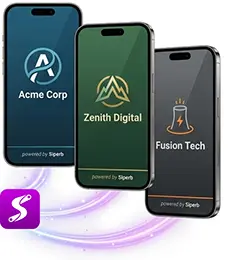
The Co-branded Softphone is the same application as Siperb Softphone — identical features, identical platforms — but presented entirely under your organisation’s identity. Your logo. Your company name. A small Powered by Siperb attribution. To your users, it’s your softphone.
When you set up a co-branded domain you become the Domain Owner: you provision users, configure how calls route to your PBX or telephony system, control feature access, and provide first-level support. Siperb manages the infrastructure, platform updates, and security underneath.
Co-branding is built for:
- VoIP resellers offering white-labelled communication services to their customer base
- Managed Service Providers bundling a branded softphone into their service stack
- Enterprises standardising on a single communications platform across multiple offices or subsidiaries
- SaaS platforms that want embedded calling without building telephony from scratch
Co-branded domains require a Business or Business Pro plan. Setup involves creating a domain, uploading your logo, and inviting your users — no development work required.
Start here: Co-branded Softphone Overview →
All Resources
These articles help you understand the thechnology at work and some technical articles. around the world of Voip, Calling, Asterisk, and more.
SIP over WebRTC integrates the robustness of Session Initiation Protocol (SIP) with the versatility of Web Real-Time Communication (WebRTC), allowing seamless voice and video communication.
19 articles →Under the HoodA look at how Siperb is built under the hood — architecture, protocols, and technical deep-dives. For the technically curious.
8 articles →Asterisk and FreeSWITCHTechnical guides on connecting Asterisk and FreeSWITCH to Siperb's WebRTC proxy — configuration, troubleshooting, and integration patterns.
3 articles →